Precompiling ASP.NET MVC applications with Teamcity & Octopus
Notice the first time you open a page or view in your ASP.NET MVC application, it’s takes quite a bit longer, and subsequent loads are faster? This is because they are compiled on-demand by IIS the first time someone tries to access them – dynamically being turned into an alpha-numerically named DLL. There are quite a few problems with this process:
- Some errors in your razor code won’t be made apparent until the view is compiled after being accessed for the first time. If you follow the principle of “crash early”, then you’ll agree the web server is much too late for this to happen!
- Web servers are meant to serve web requests, not compile code. Compiling views comes with a performance overhead that may affect the performance of concurrent requests.
- If a user is unlucky enough to be the first to access a view they will be met with a long load time, giving a poor impression that something may be wrong.
In this post I will show you how to setup true precompilation for your ASP.NET application. The goal is to package our entire web application, including views, into one or more DLL files. This comes with many benefits:
- Any compilation errors in your razor code are found well before any code is deployed to a web server.
- Compilation is done on your build server, allowing you to create a deployment package that requires no additional compiling on the web servers.
- Users are no longer victim to long load times the first time a view is accessed.
I am assuming that you already have a build and deploy process setup using Teamcity and Octopus. I will be showing you the small tweaks necessary to that process to make precompilation work.
Setup a Publishing Profile
We’re going to leverage publishing profiles as a way of instructing MSBuild on how to compile our project.
- Start by right clicking your web project in Visual Studio and clicking Publish…
- You will be asked to select a publish target. Select Custom and enter a profile name when prompted
- Under publish method select File System
- Under target location enter $(ProjectDir)precompiled and click next
- Select the build configuration you want to apply, and under File Publish Options make sure both options to delete all existing files prior to publish and precompile during publishing are both checked
- Click the Configure button that is next to the precompile during publishing option. Details on all the options in this window are documented on MSDN. For now we will make sure the allow precompiled site to be updatable option is unchecked. Select the option to Merge all outputs to a single assembly and enter a name for the DLL file, for example MyWebProject.Precompiled
- Close out of the dialogs. You can push the publish button to test your profile. Once the compile is complete, you should be able to go into your project directory and see a new folder called precompiled. Inside of it you will find the bin folder where you will see some new compiled DLL’s that weren’t there before. Those are your precompiled views.
If you look in the Properties folder in your project you should have a new folder called PublishProfiles containing an xml file with the profile configuration. Here is a sample of what it may look like:
<?xml version="1.0" encoding="utf-8"?>
<!--
This file is used by the publish/package process of your Web project. You can customize the behavior of this process
by editing this MSBuild file. In order to learn more about this please visit http://go.microsoft.com/fwlink/?LinkID=208121.
-->
<Project ToolsVersion="4.0" xmlns="http://schemas.microsoft.com/developer/msbuild/2003">
 <PropertyGroup>
 <WebPublishMethod>FileSystem</WebPublishMethod>
 <LastUsedBuildConfiguration>Release</LastUsedBuildConfiguration>
 <LastUsedPlatform>Any CPU</LastUsedPlatform>
 <SiteUrlToLaunchAfterPublish />
 <LaunchSiteAfterPublish>True</LaunchSiteAfterPublish>
 <PrecompileBeforePublish>True</PrecompileBeforePublish>
 <EnableUpdateable>False</EnableUpdateable>
 <DebugSymbols>False</DebugSymbols>
 <WDPMergeOption>MergeAllOutputsToASingleAssembly</WDPMergeOption>
 <UseMerge>True</UseMerge>
 <SingleAssemblyName>MyWebProject.Precompiled</SingleAssemblyName>
 <ExcludeApp_Data>False</ExcludeApp_Data>
 <publishUrl>$(ProjectDir)precompiled</publishUrl>
 <DeleteExistingFiles>True</DeleteExistingFiles>
 </PropertyGroup>
</Project>
MSBuild Precompiling Views in Teamcity
Now that we have a publishing profile setup, the next step is to automate the precompilation step in Teamcity.
- Add a new MSBuild step to your current build configuration (you do have one setup already to compile your project, right?). We will want this to be one of the last steps in our configuration.
- Give it a name, point the build file path to your solution file, and set the command line parameters to the following:
/p:DeployOnBuild=true
/p:PublishProfile=<YourPublishProfileName>.pubxml
/p:VisualStudioVersion=14.0
/p:Configuration=Release
/p:AspnetMergePath="C:\Program Files (x86)\Microsoft SDKs\Windows\v8.1A\bin\NETFX 4.5.1 Tools"
And that’s it, Teamcity will invoke MSBuild using the publishing profile we created earlier, and generate the precompiled DLL’s.
If you are going to be deploying using Octopus, make sure the Run OctoPack option is checked in the build step.
Creating an Octopus Package
The last step is to take our precompiled application and package it up for octopus to deploy. The first thing we need to do is create a .nuspec file in our project, make sure it has a build action property of Content. This will tell OctoPack how and what to package in our project. Name the .nuspec file the same as your web project and enter the following:
<?xml version="1.0"?>
<package xmlns="http://schemas.microsoft.com/packaging/2010/07/nuspec.xsd">
 <metadata>
  <id>MyWebProject</id>
  <title>MyWebProject</title>
  <version>0.0.0.0</version>
  <authors>Me</authors>
  <description>The MyWebProject deployment package</description>
  <releaseNotes></releaseNotes>
 </metadata>
 <files>
  <file src="precompiled\**\*.*" target=""/>
  <file src="Web.*.config" target=""/>
 </files>
</package>
Basically we’re telling OctoPack some basic information about our project, and to include everything in the precompiled folder into our package. We are also asking Octopack to include any extra config transformations, this is optional but necessary if you wish to perform config transformation during your Octopus deploy process.
That should be it. Now when TeamCity runs, it will tell MSBuild to precompile all your views into one or more DLL’s using the publishing profile you created. Once that is done it will invoke OctoPack which will look at the nuspec file in your project and create an Octopus package containing the contents of the precompiled folder. You can then push that package to your Octopus server where it can then be deployed to your web servers.
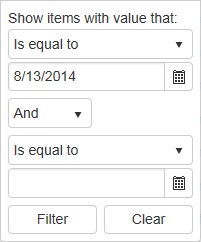 To the right is what the filter looks like on a Telerik Kendo grid when